
|
 |
 |
|
||||
|
||||||

I just got an email from Think Tank Photo full of special offers. So I'm passing them on:
Buy any Think Tank Photo Retrospective shoulder bag and get money back! Between now and the end of December, whenever you order any of Think Tank Photo's Retrospective shoulder bags, you will receive up to $20 back. The Retrospective bags are inconspicuous, soft-sided shoulder bags with a simple exterior that blends into the environment. They range in size from the Retrospective 5--which carries one standard size DSLR with one to three lenses or a complete Micro Four Thirds or rangefinder camera system-to the Retrospective 30, which holds two pro size DSLRs plus three to six lenses. Click on the "Support" tab on each Retrospective product page to download your rebate form. And don't forget, in addition to receiving the rebate check from Think Tank, you also get to select gear to receive for free with your order when you order using my special code! Read more about this offer here.
Enter to win "A Gob of Free Gear"! |
||||||
|
||||||
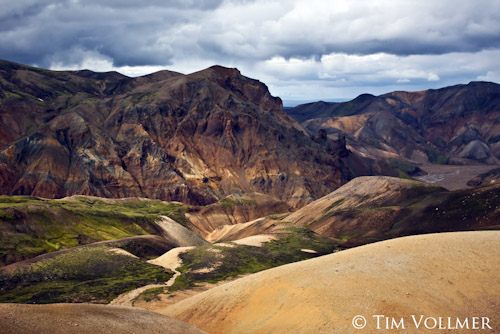
Just in the past week or so I've had three more sign ups for the Iceland photo tour. This is exciting as it means the trip is now a definite go. I can't wait to see Iceland, meet the people, sample the food, and to find out if they make any wine. I kinda doubt they do, but we'll be finding out.
There are only three spaces remaining. And remember, I've been able to arrange special "traveling spouses" pricing.Want to join us? |
||||||
|
||||||
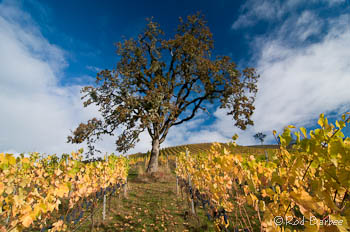
I just downloaded and started to play with NIK's Viveza plug-in. When I first took a look at it I couldn't figure out why I would need it. Color Efex Pro does so much already. What Viveza does is something a lot more basic, yet, I think, even more powerful. It gives you control over tone and color in specific portions of an image. If you need to open up the shadows in just one area of a photo, Vivez makes it easy. Same with brightening specific areas. Or changing red, green, blue, saturation, structure, and warmth.
Yes, I can do some of these things in Lightroom as well. But you can't add warmth selectively in Lightroom (With Veveza I can make an image look as if I used gold reflector at the time of shooting). Plus, you have to "brush in" any changes in Lightroom. With NIK's U-Point technology, making very selective changes is not only easy, but I think it's a lot quicker than doing the same thing (if you could) in Lightroom or with traditional Photoshop tools. As with the other NIK plug ins I've bought, I think I'm going to really like this. In fact, it could turn into my "go to" plug-in for quick selective edits. The only problem, if it is a problem, with any of these plug-ins is that they create a new file. The great advantage of Lightroom is in its non-destructive editing and the ability to create virtual copies. These virtual copies don't take up any more hard drive space whereas using the NIK plug-ins do create a new file that does take up more space on your hard drive. But with today's large and inexpensive drives, creating another file is a small trade off for the great functionality of these plug ins. |
||||||
|
||||||
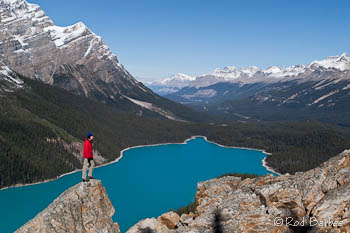
I'm happy to say that I'm already getting sign ups for next year's trips. The new workshops page is up and running and there are spaces available in all workshops and tours.
I'm also offering a special discount on workshops I'm doing with my friend Don Mammoser (pictured at left at one of our past Canadian Rockies trips). See the coupon below. |
||||||
|
||||||
|
You know all those file renaming presets and Export presets and other custom things you spent so much time creating in Lightroom? Did you know that those things don't get backed up when you backup your Lightroom catalogs? (If you've opted to store presets with the catalog, then they probably do get backed up--the problem with storing presets and stuff with the catalog is that they're only available for that catalog, not for any others you might have).
If you're moving to a new computer or recovering from a hard drive crash, you might think you have all your Lightroom stuff backed up when it's really not. So how do you back up all your presets? First you need to know where they're stored.
In Windows 7 systems they're stored in the C:/users/[your username]/Appdata]/Roaming/Adobe/Lightroom/ folder. |
||||||
|
||||||
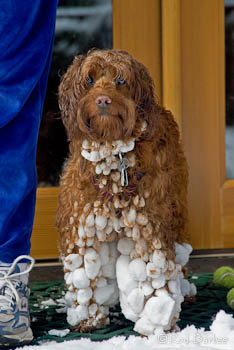
I hope everybody has a great holiday season and that we all prosper in 2012 (despite the Mayans).
Now I guess I better get on that winter to-do list. You know, the one I've been working on since 1997. |
||||||
 |
|
|||||

|
|||||||||||||||||