
|
 |
 |
|
||||
|
||||||
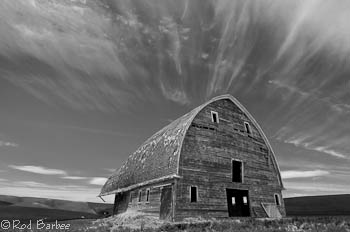
This June's Palouse Digital Workflow Workshop (June 15-19) is filling fast. As of this writing, there are only four spaces remaining.
This workshop combines the graphic Palouse landscape, including its barns, fences, rolling hills, and beautiful sunrises, with a healthy dose of Adobe Photoshop Lightroom. We'll photograph in the great light and then come back to our hotel and learn how to import, manage, process, and output the images we just captured using Lightroom (and probably some Photoshop as well) We'll be covering everything from processing images to assembling panoramic images to adding keywords and other metadata, to creating web pages and more. We'll show you how to batch process images using Export Presets and how to create great looking web pages using Lightroom's built in Web Engine as well as some great website plug-ins. There are just four spaces left so this workshop is sure to fill. Don't miss out. For more information on this workshop and how to sign up, visit our Palouse page. |
||||||
|
||||||
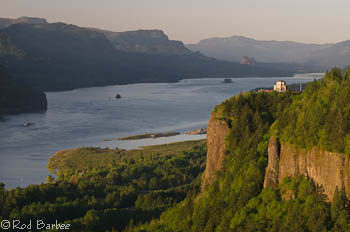
Speaking of trips filling up, there are only three spaces remaining in this trip. We'll be visiting a number of waterfalls as well as a nature preserve and other areas along the Columbia River. This is a great area to photograph and everything is pretty close. There are even sunrise/sunset opportunities for those wanting to get up extra early!
Visit my page for this trip for more information. |
||||||
|
||||||
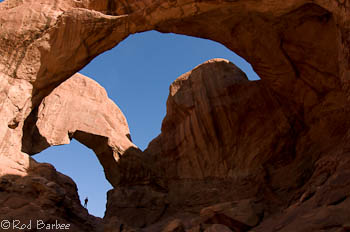
Also, Victoria Dye and I still have room in both our Arches (April 13-17) and Blue Ridge Mountains (June 1-5) workshops. Arches will be a Digital Workflow workshop like we're doing in the Palouse, and the Blue Ridge Mountains workshop will be closer to a traditional workshop. That doesn't mean we can't or won't spend time with Lightroom. We'll have plenty of classroom time to delve into Lightroom as well as do critiques and cover photographic techniques (yes, those are still important!).
Arches is another great place for a photo trip. Things are relatively close, usually less than a half hour drive (Canyonlands is a little farther), the light can be AMAZING, and it just happens to be full of really good landscape photo opportunities. So you can learn some new landscape photo techniques and then learn how to use Lightroom to optimize, manage, and output those same photos. Now that's hard to beat. |
||||||
|
||||||
|
I always tell people that to really get a handle on Photoshop, you need to understand Layers and how they work. Once you do, Photoshop actually becomes a lot easier to use and a lot more powerful.
Matt Kloskowski, whom some of you probably already know of, is a Photoshop/Lightroom guru type. I taught a workshop with him last June and saw his teaching style first hand. His easy going style and thorough knowledge make him a top notch teacher. And now Matt has an update out to his Photoshop Layers book. Like I said, to get a grip on Photoshop, get a grip on layers. I haven't actually read this book yet so my recommendations will have to be based on working with Matt and seeing many of his online tutorials. The guy knows his stuff. |
||||||
|
||||||
The Pixel Genius PhotoKit Sharpener 2 is now available. I've been using the previous version of this Photoshop Plug-in for a number of years, for capture sharpening and especially for print sharpening (I have no affiliation with this company). With the capture sharpening in Lightroom 3 and Adobe Camera Raw, I've not been using the Capture Sharpener in PK Sharpener as much, but I'll give the new version a try.
I really like this Photoshop plug-in, it takes the guesswork out of sharpening and can be included in Actions (which means it can be included in Droplets, which means it can be accessed by Lightroom in Exports) If you've been using this Plug-in, you should be getting an email from Pixel Genius with an upgrade discount code. Otherwise, the cost of this plug-in is $99.99. For more, visit the Pixel Genius website.
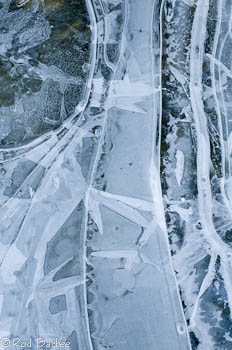
The irony here is that I used Lightroom Capture Sharpening (in the Details panel of the Develop module) and an Export Preset using Lightroom's built in output sharpening to prepare this image of frozen ice for this newsletter. |
||||||
|
||||||
|
Whether you're a pro nature photographer, have aspirations to be one, or wouldn't ruin your wonderful hobby of nature photography by turning pro, you'll get a lot out of Charlie Borland's ProNature Photographer blog. He and his contributors offer advice on everything from marketing to photographing birds in flight.
|
||||||
|
||||||
|
Are you backing up your images and important documents (especially your image catalogs)? I hope so. But just in case you're not, or if you're looking for a way to make your backups more flexible or to perhaps automate them, maybe now is the time to look into getting some backup software.
There are quite a few options out there; I'm only really familiar with a couple of them. The one I use the most (every day actually), is Genie Backup Pro 8 (PC only). If you've been reading this newsletter for awhile you might remember me mentioning back up software before. I like this software for several reasons. It's easy to set up, it gives you several options including mirror, differential, and incremental backups, and it has a flexible scheduling function too. For instance, my Lightroom catalogs get backed up every day at 6 p.m. My website files get backed up on a regular schedule. Heck, everything important gets backed up on a regular schedule. I probably don't have to convince you of the importance of backing up all your important files.
Anyway, to the real reason I'm writing this. I just got an email from the makers of Genie Backup. They're now called Genie9 for some reason. Whatever. The reason I'm writing is that right now, for a limited time, they're having a 25% off everything sale. So if you've been putting off automating your backups and have been thinking about getting backup software, here's your chance. |
||||||
|
||||||
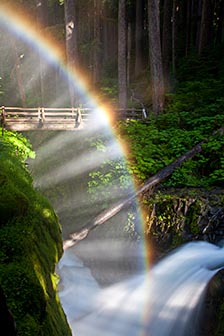
Keep an eye out as I'm probably going to be adding Olympic and Mt. Rainier trips to my schedule soon. Whether on my own or with another company is yet to be determined. If either of these locations interests you, drop me a line.
Other than that, that's all I got for now. |
||||||
 |
|
|||||