|
 |
 |
|
||||
|
||||||
My friend David Middleton has been leading
workshops for years, and years, and years, and---well
you get the idea. Basically, he's grown old doing
workshops. Wait, that doesn't sound complimentary at
all. Let's put it this way, he's been leading workshops
for about half his life now.
Over the years we've talked about how a workshop company should be run: with the emphasis on teaching and having fun learning, on going to great locations with great leaders. Well he's been mulling this around his small but perfectly formed brain (his words, not mine) for years and all that fermentation has finally born fruit (so to speak) with the formation of The Photographer's Alliance Workshops, or PAW.
From the PAW website: |
||||||
|
||||||
For those of you relatively new to photography, I
wanted to mention my Back to Basics
series in the articles section of my website.
These short, one topic lessons will introduce you to
the basic concepts of photography. The whole idea is
to become proficient at the technical aspects so they
don't get in the way of the creative aspects. Right now,
all the lessons are about the basic controls, exposure,
and metering. And some day I'll actually add to it. But
for now, enjoy. And I hope they help.
|
||||||
|
||||||
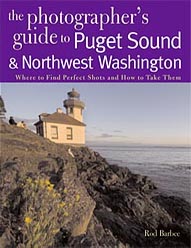
As many of you know, I had a lot more material for my
book The Photographer's Guide to Puget
Sound and Northwest Washington (I really
should have made that title shorter) than there was
room for in the 96 pages that these books are limited
to. So I opted for more site write ups in favor of more
pictures, figuring that more information on more photo
sites was a better bargain for the reader than me
getting to show off more of my images.
Anyway, a few months back I created a web page where I could post some of the sites that didn't make it into the book. Thus far I've only put up the site guide to Mt. Rainier (I know, I know. Some day I will actually get around to adding more sites). But hey, I did just add a gallery of pictures to the site. Some of these pictures are already in the book but most of them are ones that, because of those annoying space limitations, couldn't be included. |
||||||
|
||||||
|
I'm continually amazed at what Tony comes up with. In
his first tutorial he told us about creating and using
Luminosity Masks to target specific tonalities in an
image. For example, you can target just the brightest
parts of an image or the darkest parts of an image for
adjustment. He then modified that technique to target
ranges of mid-tones.
Now, in his latest tutorial he shows
us how to take those masks and target not just a
symmetrical range of mid-tones, but ranges that are
biased toward the lights or the darks. He does this by
using Mask Subtraction (or, more accurately,
subtracting one selection from another). He even
goes further and talks about masking masks for even
more control.
It's all very fascinating and may take more than one reading to absorb it all. The best way to grasp what's going on is to take one of your images that's similar to ones Tony uses in his examples, and use the techniques he's outlines. You'll be amazed. Stop by Tony's website and take a look at his tutorials (the cloning color tutorial alone will relieve you from hours of frustration using the cloning tool). Some are complete and free to read; others are in e-book form and require a donation. Right now he's offerin g a special where he'll send you PDF versions of all his tutorials and actions for a $25 donation. If you ask me, these tutorials could be an entire chapter of one of the top Photoshop books authored by the likes of Tim Grey or Scott Kelby. |
||||||
|
||||||
|
Photoshop can be fun. It can also be frustrating.
That's why there are so many books, articles, and dvd
and online tutorials.
Here are a couple of fun tutorial sites I've run across recently: From Deke McClelland, the guy who does the Photoshop tutorials that come with the program (you know, those teasers that make you want to buy the entire expensive set of tutorials), there's Deke pod For those not easily offended by language, there's this hilarious Photoshop tutorial site: You Suck at Photoshop. And for some more in depth (and more dignified) tutorials, try Julieanne Kost's presentations over at Adobe TV (very long videos) |
||||||
|
||||||
|
At just about every workshop someone asks me about
sensor cleaning. One of my favorite tools (and one of
the least expensive too!) is the SensorView sold by
Copperhill Images. This lighted magnifier makes it
easy to see dust and other nasties that may have
found their way on to your sensor. And it's not stupidly
expensive either. Take a look at
SensorView here.
As far as actually cleaning the sensor (technically,
cleaning the filter on the sensor), you should probably
have a variety of tools for that job as there can be a
variety of things that need cleaning. But the tool I use
the most, and one of the very easiest and effective to
use, is the SensorKlear pen, also available at
Copperhill Images. Take a look at
SensorKlear here. |
||||||
|
||||||
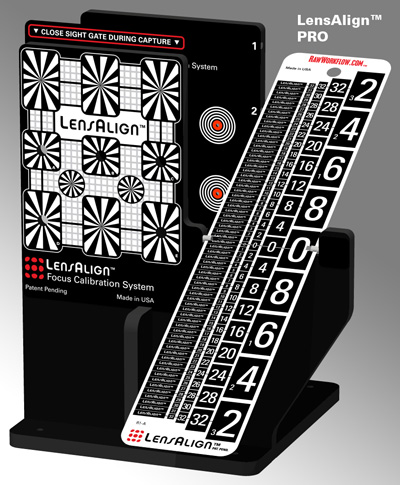
You may remember from last month that I mentioned Lens
Align from RawWorkflow.com. Well, if you're
interested, they're now shipping the Pro model. The
Lite version should be shipping by the middle of this
month. This is a very cool looking tool and if you think
you've been having problems with your autofocus
system, this tool could be just the thing you've been
waiting for.
Here's a glowing review from Luminous Landscape. |
||||||
|
||||||
|
And staying on the subject of auto focus, there's an
interesting article on auto focusing that points out why
you shouldn't move the camera to autofocus on
something and then recompose. Find out more here.
|
||||||
|
||||||
Well, that's it for now. Hopefully I haven't used up all
the good stuff and won't have to just make things up
next
month. If you're getting hammered by the winter
weather, like much of the country is (we were
supposed to get more snow today), I hope you're
keeping warm and dry and safe.
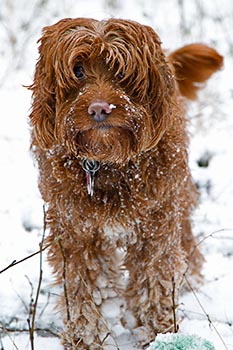
Oh, and hey, my grandson Parker just turned one year old. Which begs the question: why do I have a picture of Bailey here? Because I'm too lazy to scan one of the many Parker pictures I have. Maybe next month. |
||||||
 |
|
|||||