
|
 |
 |
|
||||
|
||||||
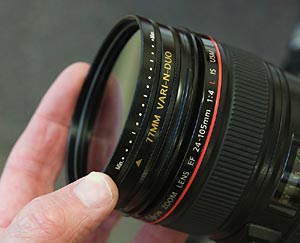
A new Singh-Ray filter combines two of their most
popular filters: the LB Warming polarizer and the Vari-
ND filter.
Currently, if I want to polarize a scene as well as add a lot of neutral density (to dramatically slow shutter speeds), I need to attach a polarizer to the front of my Vari-ND filter. Since I have the thin mount Vari- ND there are no mounting threads on the outside of the filter. This means I have to hand-hold the polarizer. Oh, it's workable, but it can be kind of a pain to hold that polarizer out there for 10 or 15 or 30 seconds or more. Singh-Ray's new Vari-N-Duo filter solves this problem. Currently this filter is available only in 77mm thread size so if you have lenses with a smaller diameter filter size you'll need a step up ring. |
||||||
|
||||||
Digital cameras and Photoshop have dramatically
expanded the options we have as photographers.
Now we can think of "finished product" possibilities
while shooting in the field. One of these possibilities
is taking several exposures of the same scene and
combining them for a final photograph.
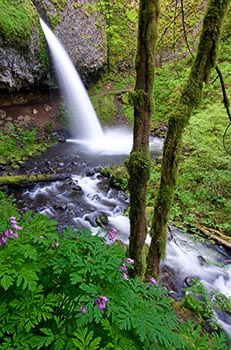
Tony Kuyper is a master at creating masks and using them to make powerful and pinpoint adjustments to his images. He's created a great series of tutorials, most of them free, that will open up a whole new world of image editing for you. The image accompanying this article was made with the guidance of Tony's Digital Scheimpflug tutorial. I know, that's a tongue twister. It's a technique of taking several photos that are focused on different parts of the scene and combining them into one image with focus throughout.
In this image I had a couple of considerations. I
wanted a long shutter speed to blur the waterfall and
stream, yet I needed a fast shutter speed to stop the
motion of the wind-blown Bleeding Heart in the
foreground. |
||||||
|
||||||
|
Michael Tapes from Rawworkflow.com
has created a new, free, utility that will extract the
embedded jpg image from your raw image
files.
This could be a great utility for workshop participants. Instead of needing to convert your RAW files to jpg for critiques and sharing, simply download your images to your laptop and use this neat little utility and extract the JPGs that are already embedded in your raw images. Not only will you be able to view them right in the folder, you can then simply copy what you want to show to a jump drive, cd, or cf card. This is also a great add-on for those of you shooting RAW+JPG in camera, which takes up extra space on your CF card. With this utility, you have the best of both worlds: shooot only in RAW to save space on the compact flash card AND you can still get get the JPG files. Not only that, the utility creates a new folder within the folder of RAW files. This can make file management a lot easier for those shooting RAW+JPG.
I just tried it out and it extracted full-sized JPGs from a
folder of 160 RAW
files (from Nikon D200 and D300 cameras) in about
25
seconds. There's also an option to create
full-size along with smaller (800 pixel) jpgs, which
takes a bit longer of course. Still, it's incredibly
fast. |
||||||
|
||||||
|
Rawworkflow.com has some other cool stuff that may
interest you.
One is a new product called Lens Align (due Dec. 10) that will help you determine if your camera's focus system is working correctly. With some newer cameras, like the newest Nikon and Canons, you can then fine tune the focus using AF micro- focusing adjustments in the camera.
And you can also get color check charts from
Rawworkflow. These are essential if you want to try
any of the camera calibration scripts
that are out there or Adobe's DNG Profile
Editor. |
||||||
|
||||||
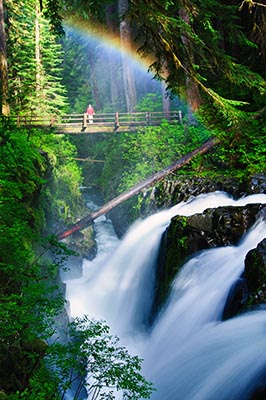
This picture was from an amazing moment at Sol Duc
Falls this past summer during my Olympic National
Park workshop. This is something I'd never seen
before in all my years of visiting Olympic. Seems that
this rainbow happens right around the summer
solstice when the sun is coming up right above the
line of the river. The heavy spray of the falls combines
with the direct light, which was coming up right behind
us, to create this spectacular scene.
So if you're on the Olympic Peninsula right around June 20th or so, get yourself up to Sol-Duc Falls early in the morning. This image was made maybe an hour or so after sunrise.
All that to illustrate that cool things can happen on
workshops! There is still room on all of my 2009
workshops (hey, a workshop would make a great
present to yourself or a loved one!!). Visit my workshops page for my schedule
and details on all workshops. |
||||||
 |
|
|||||