
|
 |
 |
|
||||
|
||||||
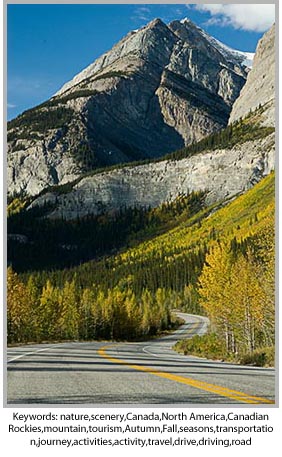
I may have mentioned David Rieck's Controlled
Vocabulary Keyword Catalog before, it's basically a file
used in conjunction with other programs to help
photographers streamline the keywording process.
With the latest version, David has created keyword
catalogs for a number of applications including iView Media
Pro/Expression Media, Image Info Toolkit, Breezebrowser,
Lightroom, Aperture, Photomechanic, and more. Now he has a version for Adobe Bridge
as well. If you're just using Bridge to add metadata,
this keyword catalog is a great addition.
The catalog is available as a subscription (meaning
you're eligible for updates) for $69. For that, you have
access to the catalogs for all the programs. Since I
use a number of these programs, I can apply
keywords using the same catalog from any of them.
This gives me a lot of flexibility as each program has
its own advantages (and disadvantages) when it
comes to keywording. |
||||||
|
||||||
|
Most of you probably already are aware of Singh-Ray
filters. Singh-Ray makes a wide variety of specialized
filters for outdoor and nature photographers. Their
filters are among the best you can buy. What you may
not know is the Singh-Ray has launched a photo blog
where several well-known photographers write
about their image making, techniques, etc.
Obviously, since this is Singh-Ray's site, most of these blog entries are about how various Singh-Ray filters help in capturing the respective photographer's vision. Click on over and take a look; you'll find some inspiring images and some great ideas for your own photography. |
||||||
|
||||||
|
Don
Mammoser and I are getting a lot of interest in
this workshop and it's looking like it may fill relatively
quickly. Because of space limitations on the jeep
tours, we won't be able
to accommodate any traveling spouses during those
portions of this field workshop. Spouses are, of
course, still welcome during the other shoots of the
workshop.
If you plan on signing up, let me know by email and I'll put your name on the list with the understanding that a deposit is on its way. I'll be in Vermont next week but I'll be able to occasionally check email. If you get an out of office reply, be assured that I'll answer as soon as I can. For more info on the workshop, visit the CO Wildflowers page of my website |
||||||
|
||||||

For any workshop plans you may be making, I wanted
to give you a head's up on a couple more workshops
for next year. David Middleton and I are planning on a
Redwoods workshop April 30 - May 4 and the Oregon
Coast July 23 - 27. Not sure yet which part of the
coast we'll decide upon though.
These workshops will be through Great American Photography Workshops. They have yet to post their 2008 schedule so you won't be able to sign up just yet (though you may be able to get on a sign up list by calling them). |
||||||
|
||||||
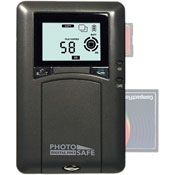
If you're looking for a no-frills, high capacity, low cost
photo storage solution, take a look at Digital Foci's
Photo Safe. I just got the 120 Gigabyte version ($160 from B&H) for my trip to
Patagonia.
Sure, I'd love to have one of the nice Epson units with those big, colorful viewing screens (Digital Foci makes similar devices), but they're darned expensive. And all I really need is something to store images when I'm traveling without my computer. The Photo Safe is easy to use; turn it on, insert your compact flash, SD, or other media card, and push the enter button. It downloads each card into a separate folder, shows download progress, and automatically shuts down after 30 seconds of no activity, which means you can plug in a card, start the download, and ignore it after that. The Photo Safe uses a rechargeable lithium-ion battery that's supposedly good for an hour and a half and can be recharged using either the included charger or by plugging into a USB port on your computer. Another nice feature is that you can partition the drive and use this unit to store images from several photographers. I've used the Photo Safe on only one trip, but so far, so good. |
||||||
|
||||||
|
That's all for now. Hope you all have a fun Halloween.
|
||||||
 |
|
|||||