|
 |
 |
|
||||
|
||||||
As many of you know, I left my cushy job at Boeing
nearly six years ago. (Six years!?! Yikes!) Anyway,
for any of you out there contemplating making the
leap to self-employment, I highly recommend “Making
a Living Without a Job” by Barbara Winter.
This book is full of ideas, inspiration, and enthusiasm
for anyone who is contemplating becoming, as
Barbara puts it, “joyfully jobless”.
Barbara also publishes a bi-monthly newsletter called "Winning Ways". Every issue is full of ideas, book recommendations, inspiration, and support. Well worth the cost of the subscription. |
||||||
|
||||||
|
I mentioned getting my digital images organized.
Well, thanks once again to Naturephotographers.net,
I’ve come across something that looks to be very
useful for this: The DAM Book. That’s Digital Asset
Management. Managing digital images, to me, is the
most frustrating thing about digital photography. I
still don’t have a solid handle on it and I’m hoping this
book will help me out. I’ll let you know what I think.
|
||||||
|
||||||
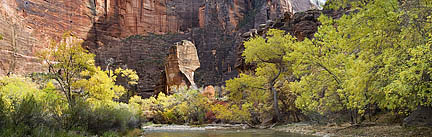
If you’ve ever manually stitched panoramas together
iin Photoshop or another program, you know that it’s
not as easy as it first appears. Even though the
Photomerge function in Photoshop does an adequate,
and sometimes pretty darn good, job, there are
plenty of times where it just doesn’t work that well
(when you have plenty of blue sky, for instance).
Recently I tried Panorama Factory and was impressed
with its ease of use and as well as its effectiveness.
One thing I like about it is that it can save your final, stitched photo in a number of file formats, including Photoshop’s PSD format. What’s more, it can leave the image in layers in case the photographer wishes to apply further refinement. |
||||||
|
||||||
|
One question I often get during workshops is what
the white balance setting on digital cameras should
be. For most newer cameras, Auto White Balance
often works quite well. But what if you want to be
sure you get the white balance just right? This is
especially important for those photographers
shooting portraits or products.
A great solution is to place a reference card in one of the pictures, and then correct to that card and apply the settings to all the other pictures that were shot in the same light. This is very easy to do if you’re shooting RAW and almost as easy to do if you’re shooting jpg. Up until recently, I would use either a grey card or a piece of white foam core as a reference. That was until I found out about Whibal. Whibal is a set of reference cards constructed out of completely color- neutral material. They make a great reference, are small enough to fit in your camera bag, and best of all, they work great. Be sure to check out the video user's guide on the WhiBal site |
||||||
|
||||||
|
I still use slide projectors for teaching, presentations,
and good ol’ fashioned fade and dissolve slide shows.
One big problem with shooting digital is that some of
my best new images aren’t available for my slide
shows. I’ve heard about Slides.com but until now,
I’ve never tried their service. It’s pretty
straightforward. Go to slides.com and register as a
user. Then upload the images you want made into
slides. You can send jpg, tiff, or psd files. Their
machine will resize your image to 4096x2730 pixels.
You can send files straight from your camera or you
can upsize them if you wish.
I sent one image sized to 4320 x 2880 (it’s what I had for a 12x18 print) and I sent some others at the size that comes out of my Nikon D100 (approx. 3000x2000 pixels). I was impressed with the results. Color was perfect (I used the Adobe RGB (1998) color space) though slides.com does not specify a preferred color space. I found these slides to be every bit as good as a high quality dupe, though not as sharp as if the image was originally shot on film. I think this could be dealt with by applying some additional sharpening for this specific output. I’ll have to do some testing. |
||||||
|
||||||
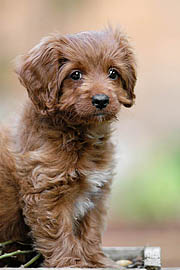
And of course, I have to keep you up to date on
what’s happing with Bailey, our adorable labradoodle.
Bailey recently discovered birds. She likes to sit at
one of the doors looking out on our backyard and
stare at the birds. So far she doesn’t seem
interested in chasing them. She also got her first
taste of snow last week as well as her first beach
experience. She wasn’t afraid of the water at all and
rushed right in after a ball. Here’s a picture of Bailey
taken with my Nikon D100 and my (brand new!!)
300mm f/4 AFS lens.
|
||||||
|
||||||
As I don't want to become embroiled in any "War on
Christmas", I'll just wish you all a happy end of 2005,
whichever way you celebrate it, as well as a great
2006.
With any luck, I'll see some of you out in the field next year, maybe at a workshop or two. Until then, take care. (speaking of workshops, I should be adding a fall color in Vermont workshop (with David Middleton) to the workshops page real soon. I'll let you know) |
||||||
 |
|
|||||